
Shared Files
Files your contacts download straight from your phone
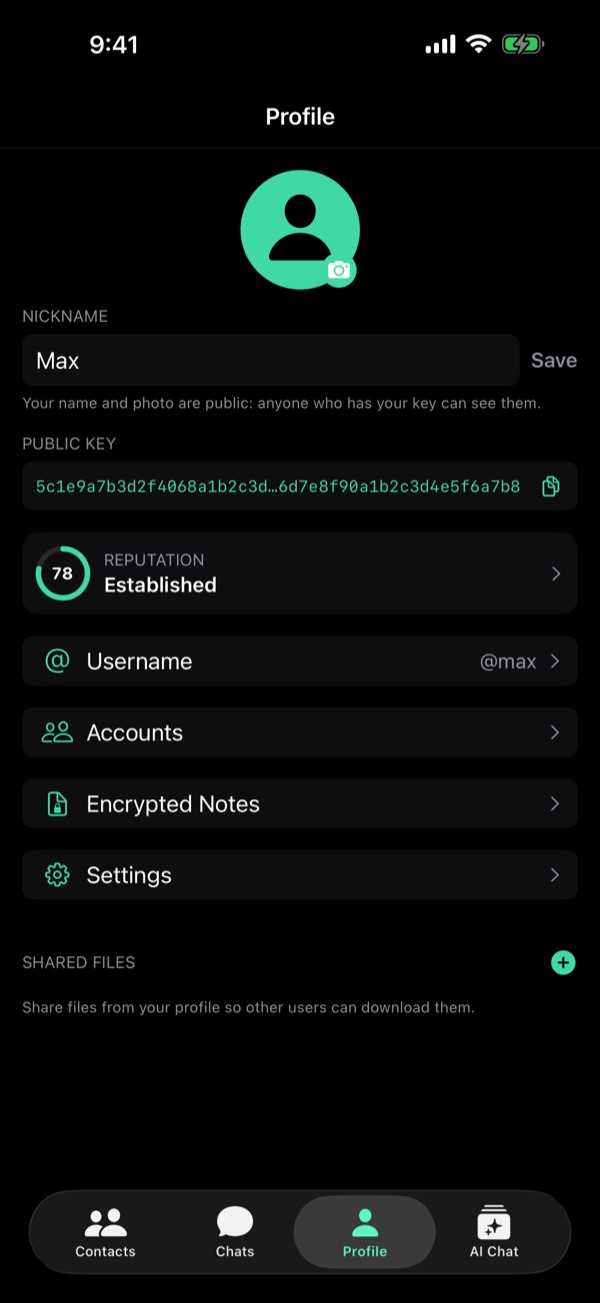
Files on your profile
Profile → Shared Files, at the bottom: tap + and pick a file. Viper keeps its own copy and lists it with its size.
Who sees them
They tap your name at the top of a chat, then Browse shared files. The list comes over a direct link, so you must have each other in contacts. They see every file on it.
Phone to phone
They tap the arrow and the file comes straight from your phone, piece by piece, each checked by SHA-256. No relay, no size limit, no Pro.
Stay online
The file comes from your phone, not the relay: they can download it only while you are online. Under each file you see who is downloading it and how far, then done.
Removing a file
Tap the bin: Viper deletes its copy, and a download in progress fails. Your original stays where it was. The list survives a restart, kept per account.
Earlier on this blog
From the guide in Viper 1.5.34: Profile → Settings → Help → Guides. All posts